


Dayuse: Hotel rooms by day
4.9595.00 Reviews
App Specs
- Version
- 8.6.0
- Updated On
- License
- Free
- Downloads
- 1,000,000+
- Developer
- DAYUSE
- Categories
- Travel & Local
- Platform
- Android
Screenshots

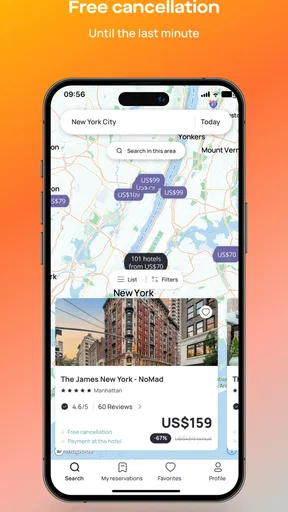
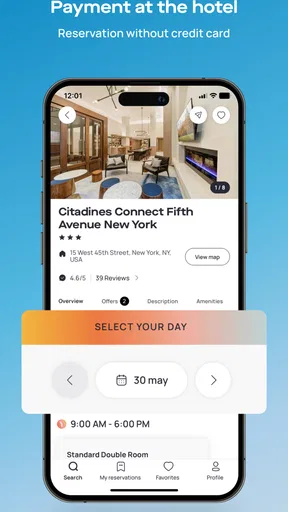
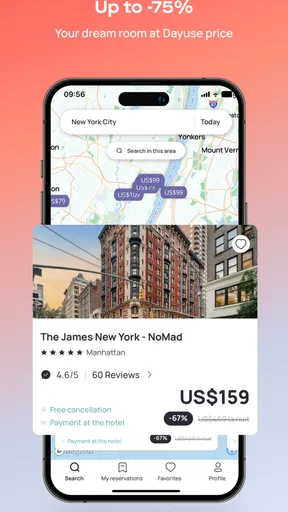
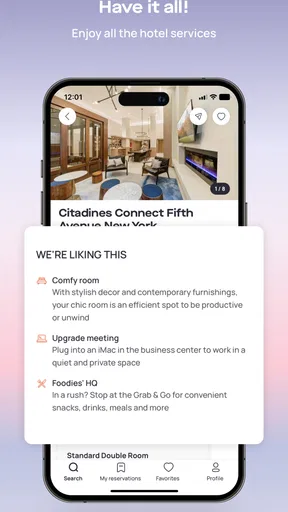
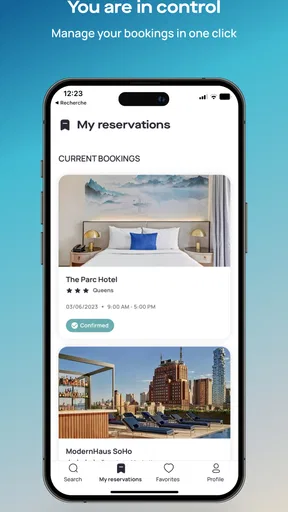

 Analysis by AppCompare
I found Dayuse: Hotel rooms by day useful for a very specific kind of travel problem: needing a comfortable private room without paying for a full overnight stay. It is a free Travel & Local app from DAYUSE, built around daytime hotel bookings rather than traditional accommodation. That difference sounds simple, but it changes how I plan airport waits, long work gaps, city stopovers, and personal downtime.
My first impression was that the app makes more sense when I treat it as a practical booking tool instead of a general hotel-search replacement. I would not open it first for a week-long holiday or a room needed late at night. I would open it when the awkward hours between two plans matter. A room can offer a bed, a bathroom, somewhere to work, and a place to reset, while avoiding the commitment of an overnight reservation.
How the app feels when speed matters
The main appeal is the directness of the idea. Rather than sorting through ordinary hotel stays and trying to interpret check-in and check-out times, I can focus on daytime availability. That narrower purpose helps the app feel less mentally demanding than a conventional booking service when my schedule is unusual. I already know the kind of stay I want: a few hours during the day, in a location that fits the rest of my plans.
In practical use, the perceived speed depends less on the app itself than on how clearly I define the search. A central location, a nearby airport, or a district close to a meeting gives the search a useful starting point. If I search too broadly, I have more options to compare and the decision naturally takes longer. This is not a flaw unique to Dayuse, but it is worth remembering because the app is most effective when I use it for a precise gap in my day.
I also like the way the concept reduces a common travel annoyance: comparing full-night rates for a stay that may last only a few hours. The app’s purpose makes the search feel more relevant from the beginning. That can save time when I am tired, carrying luggage, or trying to organize a room from a phone between trains or flights.
There is an important trade-off, though. Daytime booking is more schedule-sensitive than a standard overnight reservation. I need to look closely at the available time window and make sure it matches my actual arrival and departure plans. A fast search is not enough if I choose a room that is inconveniently far from the station or leaves too little time for check-in and travel. My best workflow is to check transport first, then use the app to search around that fixed point.
A realistic airport and workday scenario
Imagine arriving in a city early in the morning while the next flight or meeting is not until later. Sitting in an airport lounge may be expensive or uncomfortable, and a café is not always suitable for a shower, a nap, or a confidential video call. In that situation, I would search Dayuse for a hotel near the airport or along the route into town, then compare the time window with the transport schedule.
Worth Reading Before You Choose

EA SPORTS FC Mobile 26 Is a Bigger Football Game, but It Takes Time

Flipboard Shows What News Apps Must Do Beyond the Feed

Switching to Android Auto Means Rethinking Your Driving Routine

Google Calendar Makes a Crowded Week Easier to Manage

Ludo King Makes the Most of the Minutes Between Plans

Baby Panda World Brings Quick Play to Modern Phones, but Its Game Library Feels Busy
The useful part is not simply having a room. It is being able to divide a difficult travel day into manageable pieces. I can leave my luggage in a private space, freshen up, answer messages, and rest before continuing. For a business traveler, the room can also act as a temporary base between appointments. For someone traveling with a child, it may be far more practical than waiting in a public space for several hours.
I would still build in a buffer. Daytime bookings are not a substitute for checking traffic, airport transfers, or train delays. If I am working with a tight connection, I would choose a location with a simple route rather than the cheapest-looking option. The app helps me find the stay, but it cannot remove the real-world uncertainty around getting there.
What happens during heavier use
Dayuse is likely to be most demanding when I am comparing several hotels, changing locations, checking different time windows, and moving between screens while traveling. That is when a booking app has to remain understandable, because mental overload is often more frustrating than a small delay. I find the service best suited to deliberate searches: set the area, inspect the available daytime options, check the details, and make a decision.
For a quick one-off search, the experience is naturally simpler. Heavy use is different. If I am planning several stopovers or checking multiple cities, I would expect more scrolling and more comparison work. That is not necessarily a performance problem; it is the consequence of the app presenting a choice of hotels with different locations and booking periods. The more flexible my plan, the more carefully I need to organize the comparison myself.
A useful tip is to compare the total day plan, not just the room. I look at the time needed to reach the hotel, the time available inside it, and the distance to my next destination. A room that looks attractive in isolation may be a poor choice if it creates a long detour. This is one of the less obvious strengths of the app’s concept: it encourages me to think of a hotel as a short-term base, not merely as a place to sleep.
Another practical habit is to avoid making the booking decision while rushing through a station or airport. I would shortlist suitable locations before the travel day when possible. That gives me time to read the booking conditions, check the hours, and confirm that the location works. When I have to book on the move, I keep the search narrow and avoid opening too many alternatives at once.
For frequent daytime stays, I would also keep a personal note of which areas work best for my routine. The app can help me discover options, but it does not replace my own knowledge of transport connections and neighborhood convenience. A hotel close to a major station may be more valuable than one with a slightly more appealing room if I am carrying luggage and working against the clock.
Where the workflow can feel less effortless
The concept is focused, but the need for careful checking remains. A daytime room booking is not identical to walking into a hotel and asking for a short stay. I would pay attention to the selected period, arrival instructions, cancellation terms, and what is included in the particular offer. These details matter more when the booking is being used for a shower, a nap, a work session, or a family break, because each use case has different priorities.
I would also avoid assuming that every listed hotel suits every purpose. A room near an airport may be excellent for resting but awkward for sightseeing. A central property may be convenient for a meeting but less peaceful for concentrated work. The app helps with discovery, yet I still need to judge the surrounding area and my own reason for booking.
Reliability, recovery, and confidence while booking
Reliability matters especially in this category because the booking often exists to solve a time-sensitive problem. If I am between flights or appointments, I want the process to be clear enough that I can recover from a wrong search, a changed plan, or an accidental return to the previous screen without starting from scratch emotionally. The app’s value is strongest when it reduces stress rather than adding another complicated travel task.
My approach is to treat the confirmation stage as a deliberate checkpoint. Before finalizing, I would recheck the hotel name, address, date, daytime period, and guest details. This is simple advice, but it is particularly important here because a few hours in the wrong location can make the entire booking pointless. I would save the confirmation where I can reach it quickly and keep the hotel’s address available for the driver, map, or station route.
Recovery also means having a backup plan. If a train is delayed or a flight arrives late, the day-use period may no longer fit as neatly as it did when I searched. I would not rely on memory or assume that changing plans will be effortless. Instead, I would revisit the reservation information and contact the relevant service when necessary. The app is a booking interface, not a guarantee that a disrupted travel day will remain unchanged.
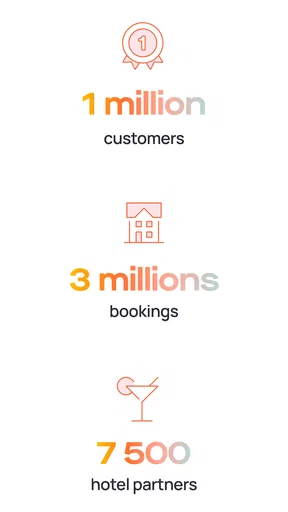
The developer, DAYUSE, has had the app available since late 2016, and it has grown into a familiar option in its niche. It has a 4.8 average from around twenty thousand ratings, with more than half a thousand written reviews and over a million installs. Those figures give me reasonable confidence that the concept has found a real audience, though popularity alone does not remove the need to inspect each booking carefully.
I appreciate that the age rating is Everyone, which makes the app broadly approachable as a travel utility. That does not mean every booking situation is equally suitable for every traveler; practical considerations such as transport, accessibility needs, luggage, and the purpose of the stay still matter. It simply makes the app feel like a general-purpose planning tool rather than a service aimed at a narrow age group.
When I would choose it over ordinary hotel apps
Traditional hotel apps are usually better when I need an overnight stay, a multi-day reservation, a broad loyalty program, or a detailed vacation-planning process. They often make more sense when the hotel itself is the destination and I want to compare a complete stay. Dayuse is more compelling when the room is a solution to a gap in the schedule.
That distinction helps prevent disappointment. I would not use this app expecting the same planning depth as a full holiday marketplace. I would use it when the key question is, “Where can I rest or work during these daytime hours?” That focused question is where the service has its clearest advantage.
It can also be preferable to informal alternatives such as spending hours in a café, using a crowded public lounge, or waiting in a terminal. Those options may cost less or require no reservation, but they do not provide the same privacy and physical comfort. On the other hand, if I only need a quiet seat for thirty minutes, booking a hotel room is excessive. The app is most sensible when the time gap is long enough for privacy, rest, or a proper reset to justify the extra planning.
Device limits and everyday practicality
The app supports devices running Android 7.0 or later, so anyone using an older system should check compatibility before planning around it. On a supported phone, the more relevant constraint is likely to be the travel environment: weak connectivity, low battery, limited screen time, or the distraction of moving through a busy terminal. I would search and save the important reservation details before entering a place where my connection may be unreliable.
Resource demands are best judged by the task rather than by expecting a booking app to behave like a game or a creative editor. Dayuse is designed for searching and reserving, so I would not install it with the expectation of constant background use. I would open it when needed, complete the search, and close it. Keeping the phone charged remains more important than trying to optimize the app itself, especially when the same device is also handling boarding passes, maps, messages, and payments.
Screen size can influence comfort. Comparing several hotels on a small phone display may require more careful scrolling, particularly when I am tired or carrying bags. I would rather use a larger screen while planning a complicated itinerary and reserve the phone for a focused search during travel. The mobile format is convenient, but convenience is not the same as having unlimited room for comparison.
One of my more useful habits is to separate discovery from commitment. First, I identify the area and the hours that make sense. Then I inspect the hotel details and only afterward complete the reservation. This reduces the chance of tapping through quickly and overlooking a location problem. It also makes the app feel lighter because I am not repeatedly restarting searches after realizing that my original timing was unrealistic.
Version 8.6.0 is the current version, and the app remains free to install. The booking itself is the part that deserves financial attention: I would review the displayed terms for the specific room and period instead of assuming that every option works the same way. That habit is more useful than judging the app only by its free download, because the real decision is whether a particular daytime stay is worth the cost compared with waiting somewhere else.
Who should use it, and who should skip it
I would recommend Dayuse to travelers with long daytime gaps, remote workers who occasionally need a private base, people facing awkward arrival and departure times, and anyone who values a shower or a nap more than another hour in a public waiting area. It can also help when a normal hotel check-in does not match an early arrival, or when a late departure leaves several empty hours after checking out.
I would be more cautious recommending it to someone who needs a guaranteed overnight room, wants to build a complex holiday itinerary, or prefers to make every arrangement through one traditional hotel platform. It is also not the right answer for a very short wait, a last-minute connection with no transport buffer, or a traveler who cannot tolerate any uncertainty around timing. In those cases, an airport lounge, a normal hotel reservation, or a flexible accommodation service may be a better fit.
Families and travelers with mobility concerns should judge the individual hotel and route rather than relying on the app’s general promise. A daytime booking can be convenient, but convenience depends on elevators, luggage access, walking distance, and the actual transfer between the terminal or station and the property. I would check those practical points before assuming that a short stay will be easy.
My performance verdict after using it as a travel tool
Dayuse performs best when I give it a narrow, concrete job: find a hotel room for a defined daytime window in a useful location. Its focused purpose can make searching feel faster than adapting an overnight hotel app to a short stay. The experience is less about endless browsing and more about matching time, place, and purpose.
Its stability and usefulness are also tied to preparation. I get the most from it when I confirm transport, inspect the booking period, and keep the reservation details accessible. During heavier comparison sessions, the main friction comes from weighing real-world trade-offs rather than from the basic idea of the app. That is a reasonable limitation, but it means I should not treat the first attractive result as automatically suitable.
For me, the strongest use case is the uncomfortable middle of a travel day: too long to wait casually, too short to justify a normal overnight stay. In that space, a private room can turn wasted time into rest or productive work. The app does not replace ordinary hotel services, travel planners, or flexible booking platforms, but it offers a more relevant starting point for daytime accommodation.
Overall, I would keep it installed if I travel often or regularly work between appointments. It is free, broadly accessible, and backed by a substantial user base, while its current version keeps the service relevant on supported devices. My recommendation is simple: use Dayuse when the hours matter more than the night. Just search with your route in mind, verify every time detail, and choose it for the specific situations where a few private hours can genuinely improve the day.
Pros
- Book hotel rooms for a few hours instead of paying for a full night.
- Useful for airport layovers
- business meetings
- or daytime rest.
- Search results show available time slots and daytime rates clearly.
- Offers access to amenities such as pools
- gyms
- and meeting spaces.
- Reservations can provide a private
- comfortable space between travel plans.
Cons
- Availability varies greatly by city
- date
- and selected time slot.
- Some hotels impose strict check-in and check-out windows.
- Taxes
- service fees
- or deposits may increase the displayed price.
- Cancellation and refund rules differ between hotels and bookings.
- Not every listed hotel includes access to all advertised amenities.
FAQs for Dayuse: Hotel rooms by day
What is Dayuse: Hotel rooms by day?
Dayuse is a booking app that lets you reserve hotel rooms for daytime stays rather than overnight accommodation. It is designed for travelers needing a private place to rest between flights, people working remotely, couples seeking a short break, or anyone wanting access to hotel facilities for a few hours. Available time slots and services depend on each property.
How does booking a daytime hotel room through Dayuse work?
After selecting a city, date, and preferred time period, Dayuse displays participating hotels with their prices, amenities, and available booking slots. You can compare the options, review the hotel information, and complete the reservation in the app. The booking confirmation normally includes the address, check-in instructions, selected hours, and any conditions set by the hotel.
Can I cancel or change a Dayuse reservation?
Cancellation and modification rules vary according to the hotel and the rate selected. Some reservations may be canceled free of charge until a specified deadline, while others can be non-refundable or have stricter conditions. Before confirming a booking, carefully check the cancellation policy shown in the app. If a problem occurs, contact Dayuse support or the hotel as soon as possible.
What is included in a Dayuse hotel booking?
A Dayuse reservation generally includes access to the booked room during the selected daytime hours, but additional benefits differ from one hotel to another. Some properties may offer Wi-Fi, parking, a pool, gym access, breakfast, or other facilities, while others charge separately for extras. Always read the listing details and confirm what is included before arriving.
Is Dayuse safe and available on Android and iPhone?
Dayuse is intended to provide reservations through participating hotels and can be downloaded on supported Android and iOS devices. As with any travel booking service, use the official app store listing and verify the property details before payment. Check the confirmation carefully, arrive within the stated check-in period, and contact customer support if the hotel cannot locate your reservation.


